

OpenHarness
An AI coding assistant in your terminal. Works with any LLM — free local models or any cloud API.







English | 简体中文
Table of Contents
- Quick Start
- Why OpenHarness?
- Terminal Interface
- Tools (44)
- Slash Commands
- Permission Modes
- Hooks
- Checkpoints & Rollback
- Agent Roles
- Headless Mode & CI/CD
- Digital Pet Cybergotchi
- MCP Servers
- Model Providers
- Authentication (Auth)
- Auto-Update
- Evals
- FAQ
- Installation
- Development
- Contributing
- Community
Quick Start
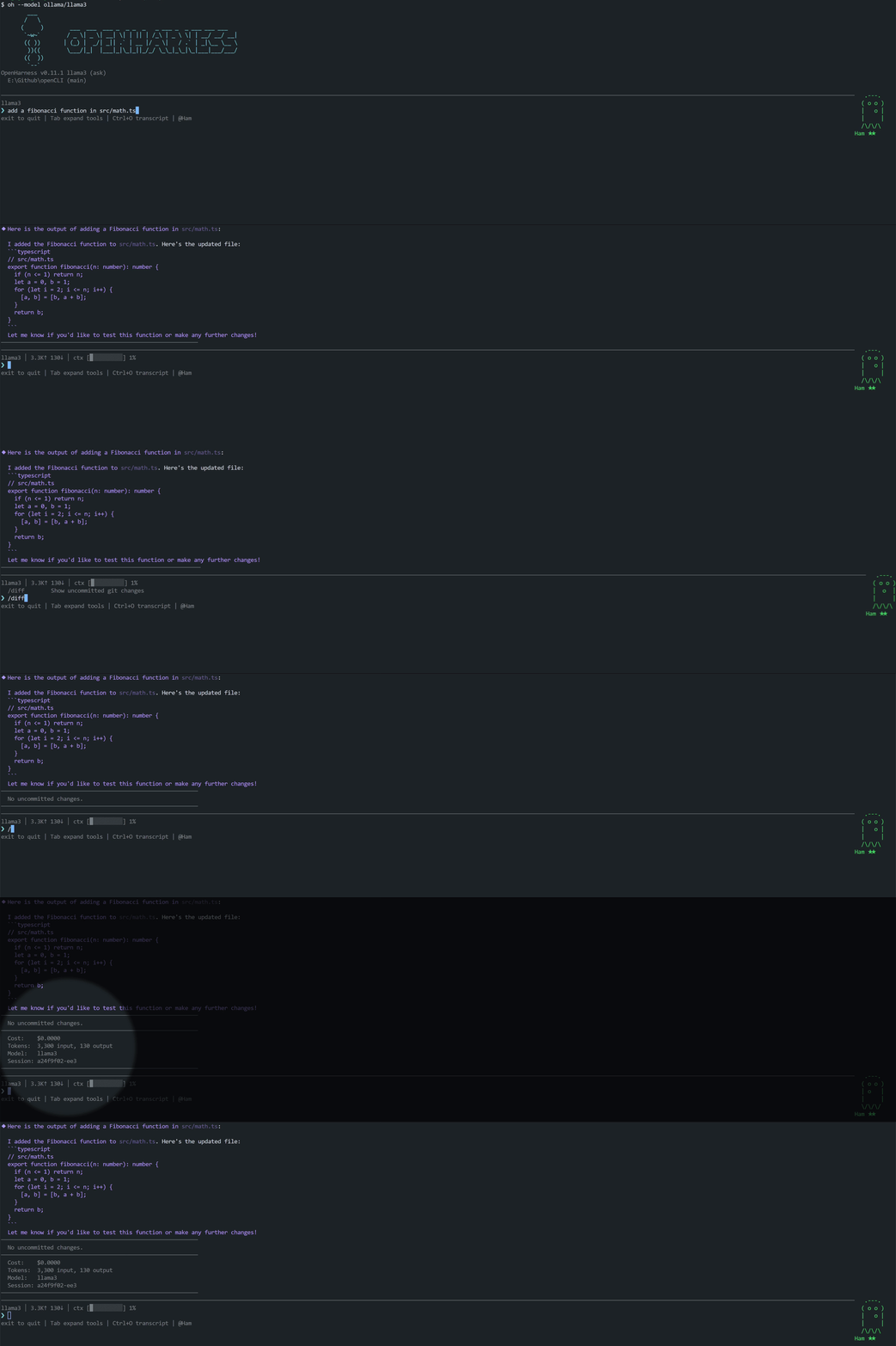
That's all it takes. OpenHarness auto-detects Ollama and starts chatting. No API key needed.
Python SDK: We also provide an official Python SDK for driving oh from Python programs (notebooks, batch scripts, ML pipelines). After npm installation, install via pip install openharness-sdk (distributed on PyPI as openharness-sdk since the un-suffixed name was taken), then from openharness import query. See `python/README.md`.
TypeScript SDK: Similarly, an official TypeScript SDK for driving oh from Node.js (VS Code extensions, Electron apps, build scripts, etc.): use @zhijiewang/openharness-sdk — install via npm install @zhijiewang/openharness-sdk, then import { query, OpenHarnessClient, tool } from "@zhijiewang/openharness-sdk". Feature-parity with the Python SDK (streaming events, stateful sessions, custom tools, permission callbacks, session resumption). See `packages/sdk/README.md`.
In-session commands:
Why OpenHarness?
Most AI coding assistants are locked to a single model provider or cost $20+/month. OpenHarness works with any LLM — run free local models with Ollama, or connect to any cloud API. Every AI edit is automatically committed to git and can be reverted with /undo.
Terminal Interface
OpenHarness uses a sequential terminal renderer inspired by Ink/Claude Code's default mode. Completed messages flush into the native scroll buffer (scrollable), while live regions (streaming output, loading animations, input box) redraw in-place via relative cursor movement.
Keybindings
| Key | Action |
|---|---|
Enter | Submit prompt |
Alt+Enter | Insert newline (multi-line input) |
↑ / ↓ | Browse input history |
Ctrl+C | Cancel current request / exit |
Ctrl+A / Ctrl+E | Jump to start / end of input box |
Ctrl+O | Expand / collapse thinking blocks |
Ctrl+K | Expand / collapse code blocks in messages |
Tab | Autocomplete slash commands / file paths / cycle through tool outputs |
/vim | Toggle Vim mode (normal/insert) |
Scrolling is handled by the terminal's native scrollbar. Completed messages enter the terminal scroll buffer. Use the terminal's built-in search (e.g. Ctrl+Shift+F in VS Code) to search conversation history.
Features
- Markdown rendering — headings, code blocks, bold, italic, lists, tables, blockquotes, links
- Syntax highlighting — keywords, strings, comments, numbers, types (20+ languages: JS/TS/Python/Rust/Go, etc.)
- Collapsible code blocks — blocks over 8 lines auto-collapse; press
Ctrl+Kto expand all - Collapsible thinking blocks — thinking blocks collapse to a one-line summary when done; press
Ctrl+Oto expand - Streaming loading animation — stage-labeled indicators (
Thinking,Running <Tool>,Calling <server>:<tool>,Running N tools) with color transitions (magenta after 30s → yellow, red after 60s) - Tool call display — argument preview, real-time streaming output, result summary (line count, duration), expand/collapse with
Tab. Tool names are color-coded by category (read: cyan, modify: yellow, execute: magenta, MCP: green) - Rich tool output — JSON files render as a colorful static tree (3-level collapse depth, line truncation); Markdown files render with full styling (headings, code blocks, tables), not plain line-by-line splitting. The renderer dispatches via the
outputTypefield (FileReadTool / WebFetchTool are labeled); unlabeled tools fall back to a heuristic path - Nested tool calls — when an
AgentorParallelAgentsspawns inner tool calls (Read, Bash, Edit), sub-calls are indented beneath the parent that spawned them. ParallelAgents also shows aTaskwrapper line for each task, grouping sub-calls by task rather than flattening them under the merged parent. 3-level indentation cap, shows… (N more level)collapse marker when exceeded - Multi-line input wrap indicator — every non-final line of multi-line input ends with a dim
↵continuation character, making line wrapping visually clear - Permission prompts — bordered prompt box with risk-level coloring, prominent Yes/No/Diff keys, inline diff with syntax highlighting
- Status bar — shows model name, token count, cost, context usage bar (customizable via config)
- Context warning — yellow warning when context window exceeds 75%
- Native terminal scrollbar — completed messages enter the scroll buffer; use the terminal's scrollbar and search
- Multi-line input —
Alt+Enterinserts a newline; auto-detected and newline-inserted on paste - Autocomplete — slash commands and file paths (with descriptions); cycle through with Tab
- File path completion — Tab completes paths, marked with
[dir]/[file] - Session browser — use
/browseto interactively browse and resume historical sessions - Desktop pet — animated Cybergotchi in the footer (toggle with
/companion off|on)
Themes
Theme preferences are saved to .oh/config.yaml and persist across sessions.
Custom Status Bar
Customize the status bar format in .oh/config.yaml:
Available variables: {model}, {tokens} (input↑ output↓), {cost} ($X.XXXX), {ctx} (context usage bar). Empty segments auto-collapse.
Tools (44)
| Tool | Risk | Description |
|---|---|---|
| Core | ||
| Bash | High | Execute shell commands with real-time streaming output (AST safety analysis) |
| PowerShell | High | Execute PowerShell commands (Windows native scripts) |
| Read | Low | Read files by line range, supports PDF |
| ImageRead | Low | Read images/PDFs for multimodal analysis |
| Write | Medium | Create or overwrite files |
| Edit | Medium | Search and replace edits |
| MultiEdit | Medium | Atomic multi-file edits (all-or-nothing) |
| Glob | Low | Find files by pattern |
| Grep | Low | Regex content search with context lines |
| LS | Low | List directory contents and sizes |
| Web | ||
| WebFetch | Medium | Fetch URL content (SSRF protection) |
| WebSearch | Medium | Web search |
| ExaSearch | Medium | Neural search via Exa (requires EXA_API_KEY) |
| RemoteTrigger | High | Send HTTP requests to webhooks/APIs |
| Tasks | ||
| TaskCreate | Low | Create structured tasks |
| TaskUpdate | Low | Update task status |
| TaskList | Low | List all tasks |
| TaskGet | Low | Get task details |
| TaskStop | Low | Stop a running task |
| TaskOutput | Low | Get task output |
| TodoWrite | Low | Manage session-level todo list (Claude Code compatible) |
| Agents | ||
| Agent | Medium | Spawn a sub-agent (with optional role) |
| ParallelAgent | Medium | Dispatch multiple agents with DAG dependencies |
| SendMessage | Low | Peer-to-peer messaging between agents |
| AskUser | Low | Ask the user a question (with options) |
| Scheduling | ||
| CronCreate | Medium | Create scheduled tasks |
| CronDelete | Medium | Delete scheduled tasks |
| CronList | Low | List all scheduled tasks |
| ScheduleWakeup | Low | Adaptively schedule the next trigger in /loop (cache-aware) |
| Planning | ||
| EnterPlanMode | Low | Enter structured planning mode |
| ExitPlanMode | Low | Exit planning mode |
| Pipeline | ||
| Pipeline | Medium | Execute a sequence of sub-tasks, passing each step's output as the next step's input |
| Code Intelligence | ||
| Diagnostics | Low | LSP-based code diagnostics |
| NotebookEdit | Medium | Edit Jupyter notebooks |
| Memory & Discovery | ||
| Memory | Low | Save / list / search persistent memory |
| Skill | Low | Invoke skills under .oh/skills/ |
| ToolSearch | Low | Find tools by description |
| SessionSearch | Low | Search historical sessions for relevant context |
| MCP | ||
| ListMcpResources | Low | List resources on connected MCP servers |
| ReadMcpResource | Low | Read a specific MCP resource by URI |
| Git Worktrees | ||
| EnterWorktree | Medium | Create an isolated git worktree |
| ExitWorktree | Medium | Remove a git worktree |
| Processes | ||
| KillProcess | High | Stop a process by PID or name |
| Monitor | Medium | Run a command in the background, streaming each line of output back to the agent |
Low-risk read-only tools auto-approve. Medium/high-risk tools prompt in ask mode. Use --trust or --auto to skip prompts.
Slash Commands
OH registers 80+ slash commands; only the most commonly used are listed below. Run /help in-session for the full list. Aliases: /q quit, /h help, /c commit, /m model, /s status.
Session:
| Command | Description |
|---|---|
/clear | Clear conversation history |
/compact | Compact conversation to free up context |
/export | Export conversation as markdown |
/copy [n] | Copy the Nth-to-last assistant reply to system clipboard |
/history [n] | List recent sessions; /history search <term> to search |
/browse | Interactive session browser with preview |
/resume <id> | Resume a saved session |
/fork | Clone the current session |
Git:
| Command | Description |
|---|---|
/diff | Show uncommitted git changes |
/undo | Undo the last AI commit |
/commit [msg] | Create a git commit |
/log | Show recent git commits |
Info:
| Command | Description |
|---|---|
/help | Show all available commands (by category) |
/cost | Show session cost and token usage |
/status | Show model, mode, git branch, MCP servers |
/config | Show configuration |
/files | List files in context |
/model <name> | Switch model in session |
/memory | View and search memory |
/doctor | Run diagnostic health check |
/hooks | List loaded hooks by event |
/reload-plugins | Hot-reload plugins, skills, hooks, and MCP server connections without restarting the session |
Settings:
| Command | Description | |
|---|---|---|
| `/theme dark | light` | Switch theme (auto-saved to config) |
/vim | Toggle Vim mode | |
| `/companion off | on` | Toggle desktop pet visibility |
/keys | Show keyboard shortcuts | |
/keybindings | Open ~/.oh/keybindings.json in $EDITOR (created on first run) |
AI:
| Command | Description |
|---|---|
/plan <task> | Enter planning mode |
/review | Review recent code changes |
/summarize | Summarize the current conversation |
/recap | One-line recap of the session (lighter than /summarize) |
Pet:
| Command | Description |
|---|---|
/cybergotchi | Feed, pet, rest, status, rename, or reset the digital pet |
Permission Modes
Controls how aggressively OpenHarness auto-approves tool calls:
| Mode | Flag | Behavior |
|---|---|---|
ask | --permission-mode ask | Prompt for medium/high-risk operations (default) |
trust | --trust | Auto-approve everything |
deny | --deny | Only allow low-risk read-only operations |
acceptEdits | --permission-mode acceptEdits | Auto-approve file edits, still ask for Bash/WebFetch/Agent |
plan | --permission-mode plan | Read-only mode — blocks all write operations |
auto | --auto | Auto-approve all operations, block dangerous bash (via AST analysis) |
bypassPermissions | --permission-mode bypassPermissions | Unconditionally approve everything (CI only) |
Bash commands are analyzed by a lightweight AST parser that detects destructive patterns (rm -rf, git push --force, curl | bash, etc.) and adjusts risk level accordingly.
Set permanently in .oh/config.yaml: permissionMode: 'acceptEdits'
Hooks
Run shell scripts automatically on key session events by adding a hooks block in .oh/config.yaml:
Event types (27 total — consistent with Claude Code stable):
| Event | Trigger | Can Block | ||
|---|---|---|---|---|
sessionStart | Session start | — | ||
sessionEnd | Session end | — | ||
turnStart | Top-level agent turn starts (after user prompt is accepted) | — | ||
turnStop | Top-level agent turn ends (corresponds to Claude Code's Stop) | — | ||
userPromptSubmit | Before user prompt reaches LLM | Yes — decision: deny | ||
userPromptExpansion | When a slash command expands into a model prompt (for audit tracking) | — | ||
preToolUse | Before a tool is called | Yes — exit code 1 / decision: deny | ||
postToolUse | After a tool succeeds | — | ||
postToolUseFailure | When a tool throws or returns isError: true | — | ||
postToolBatch | After all tool calls in a turn complete, before the next model call | — | ||
permissionRequest | When a tool needs authorization (between preToolUse and prompting) | Yes — `decision: allow | deny | ask` |
permissionDenied | When a tool call is denied (by hook / user / headless / policy) | — | ||
fileChanged | After a tool modifies a file | — | ||
cwdChanged | After the working directory changes | — | ||
subagentStart | When a sub-agent is spawned | — | ||
subagentStop | When a sub-agent completes | — | ||
preCompact | Before conversation compaction | — | ||
postCompact | After conversation compaction | — | ||
configChange | When .oh/config.yaml is modified during a session | — | ||
notification | When a notification is dispatched | — | ||
taskCreated | After TaskCreate persists a new task | — | ||
taskCompleted | When TaskUpdate transitions a task to completed | — | ||
worktreeCreate | When EnterWorktreeTool creates an isolated git worktree | — | ||
worktreeRemove | When ExitWorktreeTool removes a git worktree | — | ||
elicitation | When an MCP server requests user input via elicitation/create | Yes — `decision: allow | deny` | |
elicitationResult | After an elicitation decision is made (for audit tracking) | — | ||
instructionsLoaded | After loadRulesAsPrompt reconstructs the system prompt and loads rules | — |
Globally disable hook execution (while keeping definitions on disk for audit) with disableAllHooks: true in .oh/config.yaml.
View live: run /hooks in-session to see currently loaded hooks grouped by event.
Environment variables (available to hook scripts):
| Variable | Description |
|---|---|
OH_EVENT | Event type (sessionStart, preToolUse, etc.) |
OH_TOOL_NAME | Tool being called (tool events only) |
OH_TOOL_ARGS | JSON-encoded tool arguments (tool events only) |
OH_TOOL_OUTPUT | JSON-encoded tool output (postToolUse only) |
OH_TOOL_INPUT_JSON | Complete JSON tool input (tool events only) |
OH_SESSION_ID / OH_MODEL / OH_PROVIDER / OH_PERMISSION_MODE | Current session context |
OH_COST / OH_TOKENS | Cumulative cost and token count |
OH_FILE_PATH | Changed file path (fileChanged only) |
OH_NEW_CWD | New working directory (cwdChanged only) |
OH_TURN_NUMBER / OH_TURN_REASON | Turn boundary context (turnStart / turnStop) |
Use match to scope hooks to specific tool names (e.g. match: Bash fires only for the Bash tool). Supports substring, glob (e.g. Cron*), and /regex/flags matching.
Set jsonIO: true on a command hook to enable structured JSON I/O — the framework sends {event, ...context} on stdin and reads {decision, reason, hookSpecificOutput} from stdout. HTTP hooks accept the same response format. Full reference at docs/hooks.md.
Digital Pet Cybergotchi
OpenHarness comes with a Tamagotchi-style digital pet living in the sidebar. It reacts to your session in real-time — cheers for win streaks, complains about tool failures, gets hungry when ignored.
Hatch one:
Commands:
Needs decay over time (satiety fastest, happiness slowest). Feed and pet your pet on schedule to keep it happy.
Evolution — evolves based on lifetime milestones:
- Stage 1 (✦ Magenta): 10 sessions or 50 commits
- Stage 2 (★ Yellow + Crown): Complete 100 tasks, or 25 consecutive tool calls without failure
18 species to choose from: duck, cat, owl, penguin, rabbit, turtle, snail, octopus, axolotl, cactus, mushroom, mochi, capybara, goose, and more.
MCP Servers
Connect any MCP (Model Context Protocol) server by editing .oh/config.yaml:
MCP tools appear alongside built-in tools. /status shows connected servers.
MCP server prompts as slash commands — servers implementing prompts/list (e.g. GitHub, Sentry, Linear) automatically expose their prompts as /<server>:<prompt> slash commands. Parameters use key=value syntax with optional quoting:
Required parameters declared in a prompt template will error with usage info if missing (won't call the model). After modifying MCP config, run /reload-plugins to re-discover prompts.
Remote MCP Servers (HTTP / SSE)
Full reference at docs/mcp-servers.md. OAuth 2.1 setup at docs/mcp-servers.md (auto-triggered on 401; also available via /mcp-login and /mcp-logout commands).
MCP Server Registry — browse and install from a curated directory:
Categories: filesystem, git, database, api, search, productivity, dev-tools, ai.
Git Integration
In a git repository, OpenHarness auto-commits AI edits:
- Every AI file change is auto-committed
/undoreverts the last AI commit (OH commits only, won't touch yours)/diffshows what changed- Your uncommitted files are safe — they're committed separately before any AI edit
Checkpoints & Rollback
Every file modification is checkpointed automatically before execution. If something goes wrong:
Checkpoints are stored in .oh/checkpoints/, covering FileWrite, FileEdit, and Bash commands that modify files.
Verification Loop
After every file edit (Edit, Write, MultiEdit), OpenHarness automatically runs language-specific lint/type-check commands and feeds the results back into the agent's context. This is the single highest-impact harness engineering pattern — research shows automatic feedback delivers 2–3× quality improvement.
Auto-detection — if your project has tsconfig.json, .eslintrc*, pyproject.toml, go.mod, or Cargo.toml, verification rules are auto-identified. No configuration needed.
Custom rules (in .oh/config.yaml):
After each edit, the agent sees [Verification passed] or [Verification FAILED] with linter output, enabling self-correction.
Memory Consolidation
On session exit, OpenHarness auto-prunes stale memories via time decay:
- Memories not accessed in 30+ days decay by 0.1 relevance every 30 days
- Memories with relevance below 0.1 are permanently deleted
- Updated relevance scores are written back to memory files
This keeps the memory system lean and relevant. Configure in .oh/config.yaml:
Scheduled Tasks (Cron)
Create tasks that run automatically in the background:
Schedule syntax: every 5m, every 2h, every 1d
The cron executor checks for due tasks every 60 seconds and runs them via sub-queries. Results are saved to ~/.oh/crons/history/.
Agent Roles
Dispatch specialized sub-agents to handle specific tasks:
| Role | Description | Tools |
|---|---|---|
code-reviewer | Find bugs, security issues, style problems | Read-only |
test-writer | Generate unit and integration tests | Read + Write |
docs-writer | Write documentation and comments | Read + Write + Edit |
debugger | Systematically troubleshoot bugs | Read-only + Bash |
refactorer | Simplify code without changing behavior | All file tools + Bash |
security-auditor | OWASP, injection, secrets, CVE scanning | Read-only + Bash |
evaluator | Assess code quality and run tests (read-only) | Read-only + Bash + Diagnostics |
planner | Design step-by-step implementation plans | Read-only + Bash |
architect | Analyze architecture and design structural changes (hands off to editor for implementation) | Read-only |
editor | Apply code changes per architect's plan, no re-planning | Read + Edit + Write + MultiEdit + Bash |
migrator | Systematic codebase migration and upgrades | All file tools + Bash |
Each role restricts sub-agents to only its recommended tools. You can also explicitly pass allowed_tools:
Architect → Editor (Cost-saving pattern for multi-file changes)
For larger changes spanning multiple files, use the architect → editor two-pass workflow: architect (powerful model) reads the code and produces a structured plan; editor (lightweight model) mechanically applies the plan, no re-planning. When modelRouter is configured, OH automatically routes the architect role to the powerful tier and the editor role to the fast tier — compared to running a powerful model for both passes, multi-file changes typically save 30–50% cost.
Sub-agent Permission Isolation
Agent calls support a permission_mode parameter that can only tighten, not loosen the parent's permission mode. This is especially useful when the parent runs in trust but you want a review/audit sub-agent to remain read-only:
If a requested mode is looser than the parent's (e.g. parent ask, sub-agent requests trust), the harness silently falls back to the parent's mode — the model can never use a sub-agent to bypass the user's approval gate.
Read-only roles default to plan mode. code-reviewer, evaluator, security-auditor, architect, and planner have permissionMode: 'plan' built in — they start as statically read-only under any parent permission, no need to pass permission_mode at the call site. Custom markdown agents defined in .oh/agents/*.md can also set permissionMode: plan (or permission-mode: plan) in the frontmatter as a default.
Headless Mode
Run a prompt once without the interactive UI — great for CI/CD and scripting:
Common CI / SDK CLI Flags
| Flag | Effect |
|---|---|
--bare | Skip optional startup work (project detection, plugins, memory, skills, MCP). System prompt retains only the tool-use baseline, faster startup for repos with large CLAUDE.md / RULES.md files. |
--debug [category] | Enable categorized debug logs. --debug enables all; --debug mcp,hooks enables only specified categories. Also reads OH_DEBUG env var. |
--debug-file <path> | Append debug logs to a file instead of stderr. Also reads OH_DEBUG_FILE. |
--mcp-config <path> | Load MCP servers from an external JSON file (merged on top of .oh/config.yaml). |
--strict-mcp-config | With --mcp-config, completely ignore MCP servers in .oh/config.yaml. |
--system-prompt-file <path> / --append-system-prompt-file <path> | File path variants of --system-prompt / --append-system-prompt. |
--no-session-persistence | Skip writing sessions to ~/.oh/sessions/, suitable for one-off CI runs. |
--fallback-model <model> | Fallback model for retriable errors from the primary model. Overrides .oh/config.yaml's fallbackProviders for this run. |
--permission-prompt-tool <mcp_tool> | Delegate tool authorization decisions to a specified MCP tool (e.g. mcp__myperm__check). |
--init / --init-only | Run interactive setup wizard before / instead of executing the command. |
All flags work on both oh run and oh session. Full list at oh run --help and oh session --help.
Constrain Structured Output with --json-schema
Constrain model output to a JSON Schema. Useful for CI scripts that need to parse model output programmatically, avoiding regex heuristics:
Behavior:
- stdout: single line of JSON on successful validation.
- stderr: structured error on failure, with raw model output for debugging.
- Exit codes: 0 validation passed, 2 schema itself invalid, 3 model output not valid JSON, 4 JSON doesn't match schema.
Supported keywords: type, properties, required, items, enum. For fuller validation, pipe to a dedicated validator.
GitHub Action for PR Review
OpenHarness ships a GitHub Action for automated code review:
Exit code 0 on success, 1 on failure.
Model Providers
llama.cpp / GGUF (Local, no Ollama needed)
Direct GGUF support via llama-server, avoiding Ollama's overhead. Usually faster for large models.
Prerequisites:
- Install llama.cpp:
brew install llama.cpp, or download from github.com/ggml-org/llama.cpp - Download a GGUF model (e.g. from HuggingFace)
Start llama-server:
Configure via oh init:
- Run
oh init, select "llama.cpp / GGUF" when prompted
Or configure manually in .oh/config.yaml:
Run:
ACP (Agent Client Protocol)
Speak Agent Client Protocol over stdin/stdout, enabling ACP-compatible editors — Zed, JetBrains via ACP plugin, Cline, OpenCode, and more — to use OpenHarness as the underlying agent without writing a separate extension for each IDE:
Configure oh acp as the agent launch command in your editor's ACP integration. Session-update events (text chunks, tool calls, tool results) are automatically translated through OpenHarness's streaming protocol; permission confirmations currently still go through OpenHarness's own flow rather than ACP's requestPermission (noted for follow-up). @agentclientprotocol/sdk is an optionalDependency — if not installed, oh acp exits with a clear install prompt instead of silently failing.
Authentication (Auth)
Provider-agnostic credential management. Local LLMs (Ollama / llama.cpp / LM Studio) don't need auth — configure via oh init.
[provider] defaults to the configured default provider. --key passes the key directly; otherwise OH prompts interactively in TTY mode and reads to EOF on piped input.
Scripted Key Resolution (apiKeyHelper)
Avoid writing keys to plaintext or encrypted storage by plugging in helper scripts (1Password, pass, vault, cloud key managers, etc.). The configured command is executed when fetching a key, with OH_PROVIDER as an env var; stdout (stripped of leading/trailing whitespace) is the key.
Resolution priority: env var → encrypted storage → apiKeyHelper → legacy plaintext config.
Auto-Update
Configuration Hierarchy
Config loads in layers (later ones override earlier ones):
- Global
~/.oh/config.yaml— default provider, model, theme shared across all projects - Project
.oh/config.yaml— project-level settings - Local
.oh/config.local.yaml— personal overrides (gitignored)
Set a default provider globally once:
Then project config only needs to specify what's different:
Output Styles
Switch the agent's "personality" without modifying core instructions. Built-in styles:
default— standard software engineering assistant (no prefix)explanatory— appends a## Insightssection after each task, explaining why the decision was madelearning— leaves 1–3TODO(human)markers at key points, leaving the most learning-worthy code for you to write yourself
Custom styles are markdown files with YAML frontmatter. Save to .oh/output-styles/<name>.md (project-level) or ~/.oh/output-styles/<name>.md (user-level). Project-level > user-level > built-in.
Activate in .oh/config.yaml via outputStyle: code-review.
Project Rules
Create .oh/RULES.md in any repo (or run oh init):
Rules auto-load into every session.
OpenHarness also auto-reads the following project instruction files (if present, loaded in parent-directory-first merge order):
CLAUDE.md(Anthropic convention) — includes hierarchicalCLAUDE.mdfiles from parent directories to project root, plus global~/.claude/CLAUDE.mdAGENTS.md(agents.md cross-tool standard, adopted by Codex / Cursor / Copilot / Cline / Aider) — same parent-directory-first scanCLAUDE.local.md(gitignored personal overrides)
If a repo is already configured with AGENTS.md for another agent, OpenHarness reads it directly — no migration needed.
Skills & Plugins
Skills
Skills are markdown files with YAML frontmatter that add reusable behavior:
Lookup locations (in order):
.oh/skills/— project-level skills~/.oh/skills/— global skills (available in all projects)
Skills auto-trigger when user messages contain trigger keywords; they can also be invoked explicitly via /skill deploy.
Plugins
Plugins are npm packages that bundle skills, hooks, and MCP servers:
Name it openharness-plugin.json and place it at the npm package root. Install with npm install and OpenHarness auto-discovers it from node_modules/.
Evals
oh evals runs SWE-bench-Lite-compatible evals locally against any Provider, with enforced cost caps. Measures real bug fix performance, more meaningful than synthetic benchmarks.
Output goes to ~/.oh/evals/runs/<run-id>/:
results.json— complete data per task: cost, turns, duration, tests_status, error messages.predictions.json— directly submittable to the SWE-bench leaderboard https://www.swebench.com/。transcripts/<instance_id>.jsonl— rawstream-jsonoutput from each task sub-process.
The pluggable pack protocol (pack.json + instances.jsonl + fixtures/<id>/) lets you write packs against any test suite. The scripts/build-evals-pack.mjs tool can bake a SWE-bench-Lite-compatible repo at a given base_commit into a fixture. See CONTRIBUTING.md.
The built-in swe-bench-lite-mini pack (10 curated instances, runs out of the box) ships in v2.40.2.
How It Works
FAQ
Can I use it offline? Yes. Use Ollama with a local model — no network, no API key needed.
How much does it cost? Free. OpenHarness uses the MIT license. Cloud models require your own API key (BYOK), or use Ollama entirely free.
Is it secure? Yes. Seven permission modes control what tools can do. Bash commands are analyzed by an AST parser that blocks destructive patterns (rm -rf, curl | bash, etc.). Every file change is checkpointed and can be reverted via /rewind.
Can I use it in CI/CD? Yes. Run headless mode with oh -p "prompt" --auto, or use the built-in GitHub Action for PR review.
Does it support my language/framework? Yes. OpenHarness is language-agnostic — it reads, writes, and executes code in any language. Syntax highlighting covers 20+ languages.
How does it compare to Claude Code? ~95% feature parity for CLI use cases. Key advantages: works with any LLM (not just Anthropic), and uses the MIT license. See Why OpenHarness? above.
Installation
Requires Node.js 18+.
Development
Adding a Tool
Implement the Tool interface (with a Zod input schema) in src/tools/YourTool/index.ts, then register it in src/tools.ts.
Adding a Model Provider
Implement the Provider interface in src/providers/yourprovider.ts, then add a case in src/providers/index.ts.
Contributing
See CONTRIBUTING.md.
Community
Join the OpenHarness community to get help, share workflows, and discuss the future of AI coding assistants!
| Platform | Details & Links |
|---|---|
| 🟣 Discord | Join our Discord to chat with developers in real-time and get support. |
| 🔵 Feishu / Lark | Scan the QR code below to join the community collaboration group:<br><br><img src="https://github.com/user-attachments/assets/54ade077-22ad-45d2-b38a-623464677d53" width="160" alt="Feishu group QR code"> |
| Scan the QR code below to join the WeChat group:<br><br><img src="https://github.com/user-attachments/assets/adcf291a-9ffe-4738-8608-f46a21e18db0" width="160" alt="WeChat group QR code"> |
License
MIT

Community discussion
Discussion and rating
Capture real usage experience first; ratings are optional supporting signals.